

Google Ads for small business works when people already search for what you sell, when you can measure which clicks become customers, and when one new customer is worth more than the clicks it takes to win them. A plumber, a dentist, an accountant or a local gym usually meets all three tests. A business selling something nobody searches for, or with a tiny profit per sale, often does not.
So, do Google Ads work for small businesses? Yes, for a large share of them, and they fail for a predictable set of reasons: the default setup sends money to the wrong places, tracking is missing, and the owner judges results on clicks. Fix those and Google Ads becomes one of the few marketing channels a small business can switch on, measure and scale within weeks.
When Google Ads for small business makes sense, and when it doesn't
Before opening an account, check four things.
- People search for it. Type the phrases a customer would use into Google. If ads already show for them, there is demand and competition. If nothing shows and the keyword planner says almost nobody searches, Google Ads is the wrong first channel. Social ads, which create demand, may suit better.
- A customer is worth enough. Work out the gross profit on a first sale and, if customers come back, over a year. A service with a high value per customer can afford expensive clicks. A shop selling low-margin items once may not.
- You can answer and follow up. Paid calls that ring out and form leads answered two days later turn good ads into wasted spend.
- You can measure it. If you cannot tell which calls, forms or sales came from ads, you cannot tell whether they work.
Google Ads suits local services, professional services, high-intent ecommerce products and B2B services with clear search terms. It struggles with brand-new product categories, impulse purchases people never search for, and businesses where every sale needs a long relationship before any money changes hands.
How Google Ads works in plain terms
Every time someone searches, Google runs an auction among the advertisers whose keywords match. It ranks ads by Ad Rank, which combines your bid, the quality and relevance of your ad and landing page, and the expected effect of your assets. A more relevant ad can beat a higher bid, which is why small, well-built accounts can compete with big spenders on the searches that matter to them. We explain the quality side in Google Ads Quality Score.
You pay when someone clicks, and you control spend with a daily budget. One fact surprises many owners: Google can spend up to twice your average daily budget on a busy day, then balances it so the month does not exceed about 30.4 times the daily figure. A day of high spend is normal and not a billing error. The budget pacing calculator shows where a month is likely to land.
Campaign type decides where ads appear. Search campaigns show text ads on Google results. Display, Demand Gen, Video and Performance Max campaigns reach further across YouTube, Gmail, apps and websites. For a small business starting out, Search is almost always the right place to begin, because it reaches people at the moment they are looking.
How to work out a starting budget
A starting budget should be big enough to learn something in a reasonable time. The simplest way to size it works backwards from the result you want to measure.
- Estimate the cost per click for your main keywords from the keyword planner.
- Estimate the share of clicks that will call or submit a form. Many service businesses see somewhere between a few percent and the low teens; your own website data is the best guide.
- Decide how many leads you need in a month to judge the campaign. Fifteen to thirty is a sensible floor for drawing conclusions.
- Budget = leads needed ÷ conversion rate × cost per click.
Here is the arithmetic with hypothetical numbers. Say clicks cost about $6, about 8% of visitors get in touch, and you want 20 leads in the first month. You need 250 clicks, which is about $1,500 for the month, or roughly $50 a day. If that is more than you can risk, narrow the plan to your most profitable service and closest area instead of spreading a small budget thinly. A small budget across ten services learns nothing about any of them. The PPC forecast calculator runs these numbers with your own inputs.
Setting up your first campaign, step by step
Google's default sign-up flow pushes new advertisers into a Smart campaign with broad settings. Most small businesses do better building one Search campaign by hand.
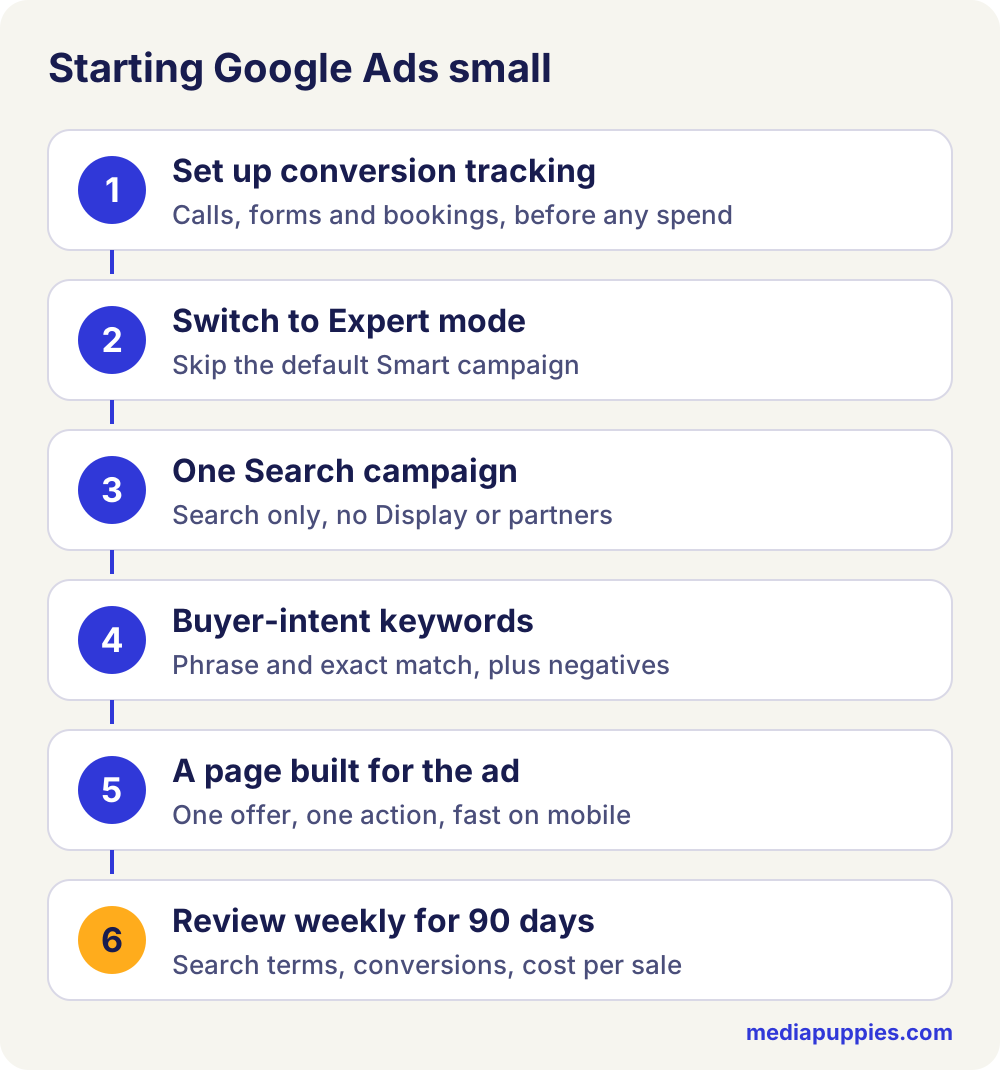
- Set up conversion tracking first. Track calls from ads, calls from the website, form submissions and online bookings. Without this, every later decision is a guess. Our guide to checking Google Ads conversion tracking walks through it.
- Switch to Expert mode. During sign-up there is an option to create an account without a campaign or switch to Expert mode. Take it.
- Create one Search campaign. Untick the Google Display Network and, at first, Search partners. Both are on by default and both tend to bring lower-quality clicks for small advertisers.
- Set location to presence. Choose "Presence: people in or regularly in your included locations". The default also includes people merely interested in the area.
- Set an ad schedule. If the conversion is a phone call, run ads only when someone answers.
- Build two to four ad groups. One per service or product line, each with a tight list of keywords and its own responsive search ad.
- Add assets. Sitelinks, callouts, a call asset and a location asset linked to your Google Business Profile.
- Choose a simple bid strategy. Manual CPC or Maximise clicks with a maximum CPC limit to start, then move to Maximise conversions once the campaign records conversions steadily.
The structure behind this is covered in more depth in how to structure Google Search ads.
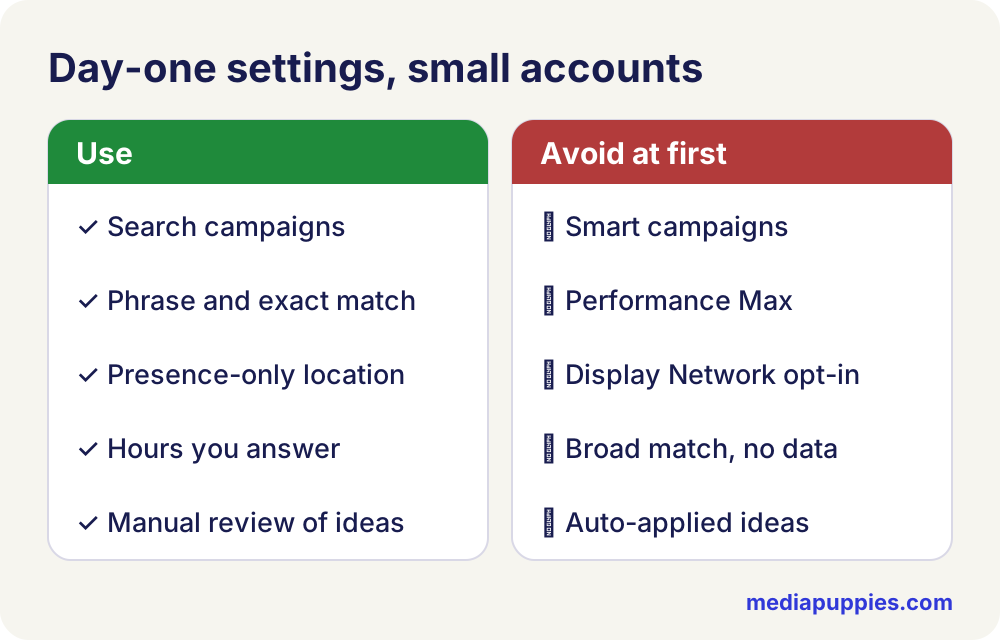
Campaign types to avoid first
| Campaign type | Why it is risky as a first campaign | When it can make sense later |
|---|---|---|
| Smart campaigns | Few controls, limited search term visibility, broad keyword themes | Rarely; a hand-built Search campaign does the same job with more control |
| Performance Max | Spends across every Google channel and leans on brand searches unless excluded | Ecommerce with a product feed and clean conversion data |
| Display | Cheap clicks, many accidental, low intent | Remarketing to past visitors once there is enough traffic |
| Demand Gen and Video | Builds awareness; hard to measure for a small budget | When search demand is maxed out and the brand needs reach |
Performance Max is not a bad product. It needs good conversion data to work and it hides much of what it does, which makes it a poor teacher for a new account. If you do try it, exclude your brand terms; the steps are in Performance Max brand exclusions.
Choosing keywords a small budget can afford
The best keywords for a small business show buying intent and fit your service closely. "Emergency electrician Leeds" beats "electrician". "Bookkeeper for contractors" beats "accounting". Longer, more specific phrases cost less, convert better and waste less.
- Lead with intent words. Near me, cost, quote, hire, book, service, repair, company, plus the city or area.
- Use phrase and exact match. Broad match with no conversion data matches far too widely for a small budget.
- Add negatives from day one. Free, jobs, salary, course, training, how to, DIY, and anything you do not offer.
- Read the search terms report weekly. It shows what people actually typed before clicking. Add good terms as keywords and bad ones as negatives. Our guide to the search terms report and the negative keywords audit cover this.
Bid on your own business name too, in its own campaign. Brand clicks are cheap, protect you from competitors bidding on your name, and kept separate they do not flatter the other numbers.
Writing ads that earn the right click
A responsive search ad takes up to 15 headlines and 4 descriptions, and Google mixes them. For a small business the goal is a click from the right person and no click from the wrong one, because every click costs money.
- Repeat the search. If someone searches "same day boiler repair", a headline that says "Same Day Boiler Repair" tells them they are in the right place.
- Say where you work. The town or area in a headline filters out people you cannot serve and lifts relevance for local searches.
- Give a concrete reason to choose you. Years trading, licences, guarantees, opening hours, review count, response time. Specific beats "quality service".
- Filter on purpose. If you only do commercial work, say "Commercial Only". If you have a minimum job size, hint at it with words like "full renovations". Fewer, better clicks are cheaper than many wrong ones.
- Use a clear call to action. Call now, book online, get a quote today.
Pin a headline only when it must always show, such as a licence or regulatory line. Pinning everything removes the testing that makes responsive ads useful. Check the asset report after a few weeks and replace the headlines marked low.
Which conversions to count, and which to ignore
Google Ads optimises toward whatever you mark as a primary conversion. Get this wrong and a campaign can look successful while bringing in nothing.
- Count: calls longer than about a minute, completed contact forms, online bookings, purchases, and quote requests.
- Do not count as primary: page views, clicks on the phone number without a call, time on site, or scrolling. These can sit as secondary conversions for information.
- Remove duplicates. A form that fires a conversion on submit and another on the thank-you page counts every lead twice and halves your real cost per lead on paper.
- Close the loop when you can. If you record which leads became paying customers in a CRM or even a spreadsheet, you can import those back into Google Ads as offline conversions. Bidding then learns from the leads that paid.
Once a campaign records about 15 to 30 real conversions a month, Smart Bidding strategies such as Maximise conversions or Target CPA have enough signal to work with. Below that, keep bidding simple and spend the time on keywords and the landing page.
Landing pages and phone calls
A small business ad usually sends people to the home page, and the home page tries to say everything to everyone. A page built for the ad converts better: the headline repeats the service searched for, the phone number and form sit at the top, and reviews, photos of real work and the service area sit just below. It must load fast on a phone, because most local searches happen on one.
For calls, answer quickly and track the outcome. Many owners who say Google Ads does not work have ads that work and phones that do not get answered. Check missed calls by hour of day in your call tracking or phone system, and listen to a sample of recorded calls each week.
Judging the first 90 days
All numbers here are hypothetical, to show how to judge results. Say a family law firm spends $2,000 a month for three months.
| Month 1 | Month 2 | Month 3 | |
|---|---|---|---|
| Spend | $2,000 | $2,000 | $2,000 |
| Clicks | 250 | 270 | 290 |
| Calls and forms | 15 | 22 | 29 |
| Consultations booked | 6 | 10 | 14 |
| New clients | 2 | 4 | 6 |
| Cost per new client | $1,000 | $500 | About $333 |
Month one is mostly learning: wasted search terms get found, negatives get added, the landing page gets fixed. Judging Google Ads on month one alone kills many campaigns that would have worked. By month three, the question is simple. Is the profit from a new client higher than the cost of winning one? If the firm earns well above $333 in profit per client, the campaign works and can grow. If it does not, the fix might be a better landing page, a narrower keyword list or a different service focus before more budget.
Common small business Google Ads mistakes
- Accepting the default Smart campaign. It gives Google the controls a small budget needs you to keep.
- Leaving Display and Search partners on. Budget leaks to low-intent placements.
- Auto-applied recommendations. Some raise budgets or add broad keywords without asking. Review recommendations by hand and turn off auto-apply in the Recommendations section.
- No conversion tracking. Without it, Smart Bidding optimises for nothing useful and you cannot judge results.
- Too many services, too little budget. Concentrate on the best one first.
- Stopping after a month. Give a properly tracked campaign about 90 days before deciding.
- Getting the currency and time zone wrong at sign-up. Neither can be changed later without opening a new account.
More of these leaks are listed in where ad budget leaks.
Google Ads for small business in the US, UK and Australia
- US. Local Services Ads are available for many home and professional services and sit above normal ads, paid per lead. Service businesses should test them next to Search.
- UK. Searchers use local terms ("solicitor", "boiler repair", "MOT"), and Google Ads invoices for UK businesses include VAT. Ads in regulated sectors such as financial services must follow FCA rules on promotions, and all ads follow the CAP Code.
- Australia. Use Australian terms in keywords and copy ("tradie", "aircon", "solicitor" or "lawyer" depending on the state), and remember that the busiest seasons fall at different times of the year from the northern hemisphere.
In every market, connect your Google Business Profile to the ads account for location assets, and keep reviews flowing. Reviews help both the ads and the map results.
Small businesses that also want customers from outside their home market should be careful. Running one campaign across several countries mixes currencies, search habits and time zones, and the cheapest country tends to take the budget. Give each country its own campaign, budget, schedule and landing page. Set the account currency to the one you invoice in, since Google converts other markets' costs into it, and keep an eye on exchange rates when comparing results month to month.
Finally, keep records. A simple monthly log of spend, leads, customers and the main changes made will tell you more about what works than any dashboard, and it makes handing the account to someone else much easier later.
Doing it yourself or getting help
A small business owner can run one Search campaign well with two to three hours a week, if they follow a routine: search terms, negatives, budget pacing and a look at which leads became customers. Our guide to PPC campaign management sets out that routine day by day. Help becomes worth it when the account grows past a few campaigns, when Performance Max or Shopping enters the picture, or when the owner's time is worth more spent elsewhere. We cover what management costs and how pricing models compare in Google Ads management cost.
Our Google Ads agency team sets up and runs Search, Local Services and Performance Max accounts for small and growing businesses in the US, UK, Canada and Australia, starting with tracking and a narrow, profitable first campaign. Fees depend on the scope, and we say it on the first call.
Questions people ask before hiring
Do Google Ads work for small businesses?
Yes, when people search for what you sell, a customer is worth more than the clicks needed to win one, and you track which clicks become customers.
How much should a small business spend on Google Ads to start?
Work backwards: leads you need to judge the campaign, divided by your expected conversion rate, multiplied by the cost per click. Then focus that budget on your most profitable service and area.
Which Google Ads campaign type is best for a small business?
A hand-built Search campaign in Expert mode, with Display and Search partners turned off at first. Smart campaigns and Performance Max work better later, once tracking is solid.
Why does Google spend more than my daily budget?
Google can spend up to twice the average daily budget on a busy day, then balances spend so the month stays within about 30.4 times the daily budget.
How long should I run Google Ads before deciding if they work?
About 90 days with proper conversion tracking. The first month is mostly learning which search terms and pages work.
Should a small business run Google Ads itself?
One Search campaign can be run well in two to three hours a week with a set routine. Help becomes worth it as the account grows or the owner's time gets scarcer.
Should I bid on my own business name?
Usually yes, in a separate campaign. Brand clicks are cheap, protect you from competitors, and stay out of the other campaigns' numbers.